


Language: English
Contact us

Solutions / AVATAR CHATOPS

Solutions / AVATAR series, NAL's AI platforms for business

AVATAR CHATOPS

Smart Workspace platform for people and AI

AVATAR CHATOPS is a Smart Workspace platform where AI agents and people work together smoothly. It builds AI into daily communication and work processes, and helps your teams work more efficiently and more effectively.

Illustrative AVATAR CHATOPS screens. Scene 1, Chat: in the "# Project A" channel, Sato asks Tanaka for a first draft of the proposal, and Tanaka takes it on. Scene 2, Task: Kanban_bot creates the card "#12 Proposal draft" right away, and it goes into ToDo on the Kanban board. Scene 3, AI: Tanaka asks the AI assistant for a team meeting notice and gets a draft back. Scene 4, Meeting: a reminder arrives before the start, and the meeting begins in the channel's voice room.

  1. Chat
  2. Task
  3. AI
  4. Meeting
Illustrative screen, not the actual product UI. All names and numbers are fictional.

The workspace

Conversations and tasks in one channel

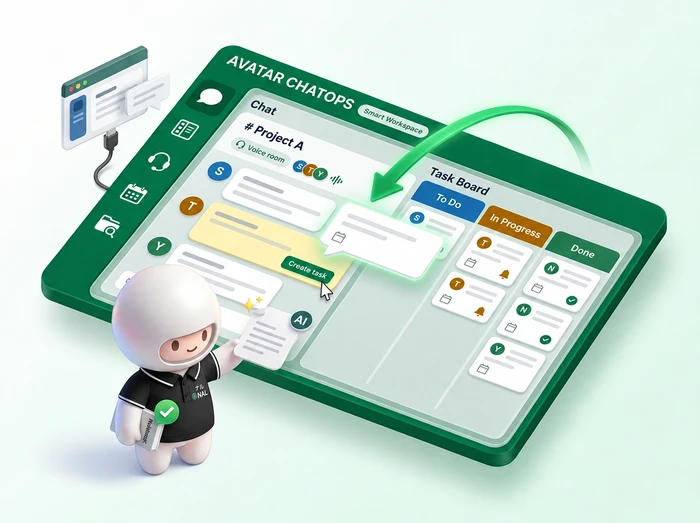
Illustration of AVATAR CHATOPS. When someone picks "Create task" on a message in a channel, NAL's AI character, Avatar, adds a card to the task board on the spot.

Sound familiar?

More tools, but work still isn't connected

Chat in one tool, tasks in another, meetings in yet another, so finding what you need takes more and more time
Decisions made in chat slip away before they become tasks
Across departments and projects, you can't see who is working on what
You want to use AI, but it sits apart from your daily work

The AVATAR CHATOPS approach

AI as a member of the team, not another tool

AVATAR CHATOPS brings conversations, tasks, meetings, and files into one workspace. AI and bots handle drafts and notifications in that same place. People spend their time on decisions and conversations, and AI becomes part of the daily flow of work.

How it works

People and AI work in the same channel

In the diagram, the AI and A program that posts messages or sends notices automatically when set conditions are met. It takes over tasks that follow the same steps every time, such as deadline reminders. column shows what posts to the channel automatically. Steps run from top to bottom, in time order.

People (members)AI and botsOther systems AVATAR CHATOPS Channel (# Project A) Ask for help (@mention) Add decisions as tasks Kanban (ToDo) Draft a notice (generative AI) Voice call, screen share Send updates Post due dates and progress Posts from people, AI, and bots stay in one channel in time order. Decisions become tasks at once, and system updates join the same flow. AVATAR CHATOPS · # Project A People (members) Ask for help (@mention) People (members) Add decisions as tasks ToDo AI and bots Draft a notice (generative AI) People (members) Voice call, screen share Other systems Send updates AI and bots Post due dates and progress Posts from people, AI, and bots stay in one channel in time order. Decisions become tasks at once, and system updates join the same flow.

Screens

What you discuss turns into work on the spot

Chat, A board with a column for each work status, such as ToDo, Doing, and Done, where each task is a card. You can see at a glance who is working on what and how far along it is., AI assistant, meetings, schedule, and files. Every screen you need for daily work is in one place.

Chat is where your team talks every day.When you create a task from a message, a bot posts the card details to the channel. Open the thread to read the rest of the conversation.

Kanban is a board that lays out work by status.Move a card to update the task status. Open a card to see the owner, the due date, and the conversation it came from.

AI assistant is an AI you can ask for help in chat.Ask the AI assistant, and it drafts notices or answers questions about company rules.

Meeting is a voice room inside the channel.Join the channel's voice room to start a meeting right away while you share your screen. You can also turn the mic and speaker on or off here.

Schedule is your team's calendar.Check the week's schedule and book a free meeting room.

Files and search are where you find the channel's documents.Filter search results by files or messages. You can check any message you find in its original conversation.

Project AFor the proposal project

Today

Sato

Hi all! I'd like to settle the proposal outline before next week's team meeting. @Tanaka, could you make a first draft?

Tanaka

Got it! I'll make it a task.

Kanban_botBOT

Card created

#12Proposal draft

Owner: @Tanaka · Status: ToDo

I'd like to settle the proposal outline before next week's team meeting.

Due Oct 2

Project AFor the proposal project

Tasks you create from messages become cards on the Kanban board.

Scroll sideways to see more

ToDo3

#12Proposal draftDocsMake 2 to 3 outline options based on past proposals.Oct 2
#13Meeting noticeMeetingSet the date and agenda, then post the notice in # Project A.Sep 30Overdue
#14Question listResearchList what we need to ask the client.Oct 2

Doing2

#9Review scheduleDocsCheck the dates and owners again.Oct 1
#10Organize requirementsSpecsTurn the interview notes into one list.Oct 5

Done3

#5Kickoff prepPrepPrepare the materials and a meeting room.Sep 18
#6Team chartDocsPut the members and roles on 1 page.Sep 18
#7Share minutesMeetingPost the kickoff minutes in # Project A.Sep 18

AI assistantBOTDirect message

Tanaka

Could you draft the notice for next week's team meeting?

AI assistantAI

Sure. How does this look?

Team meeting notice

When: Wed, Oct 7, 10:00 to 11:00

Where: Room A (you can also join from the # Project A voice room)

Agenda: Proposal outline

Tanaka

Perfect, thanks!
By the way, what's the deadline to apply for summer vacation?

AI assistantAI

Under the work rules, you need to apply at least 2 weeks before your leave starts. You can apply in the attendance system.

Source: Work rules, Article 15

Project AFor the proposal project

Screen shareSato's screen

Proposal outline (draft)

  1. Current challenges
  2. Direction of our proposal
  3. Approach and schedule

Team talk

Rooms

# Project A4 joined

  • Sato
  • Tanaka (you)
  • Suzuki
  • Yamamoto

Dev team0 joined

Company standup0 joined

CalendarSep 28 to Oct 2

Scroll sideways to see more

MonTueWedThuFri
10:00Team meetingRoom A
11:00
12:00
13:00Project B meetingOnlineDoc review# Project A voice room
14:00
15:001:1Room BWeekly retroRoom A
16:00

Rooms free on Thu at 15:00

Room A · taken

AlertYou get a reminder before "Team meeting" starts.

SearchFiles: 2 · Messages: 1

Files

  • PDFproposal_outline.pdfTanaka · # Project A · Today2.4MB
  • XLSproposal_schedule.xlsxTanaka · # Project A · Sep 24180KB

Messages

Sato · # Project A · Today 10:12I'd like to settle the proposal outline before next week's team meeting.

Illustrative screen, not the actual product UI. All names and numbers are fictional.

Features

Talk, decide, and move work forward in one place

Chat and Kanban

Conversations and tasks in one channel

Create a channel for each project or topic, and bring the right people and information together in one place. You can turn decisions into tasks straight from a message, and update progress by moving cards on the Kanban board.

AI assistant and bots

AI and bots as members of the channel

You can ask an AI assistant built on Short for large language model. It is AI trained on huge amounts of text, so it can understand and reply in everyday language. This is what lets the AI assistant draft text. technology (large language models) for help, the same way you chat. AI drafts notices and other text in your usual channel, and bots post reminders there about task deadlines and progress.

Meeting

Voice calls and screen sharing

Move from chat straight into a voice call or screen sharing. You can also create dedicated online meeting rooms that people join only after approval.

Schedule and files

Schedules and files in one place

Manage the schedules of meetings and company events, plus shared files, together with your channels. You can also book shared meeting rooms.

Search and notifications

Search and notifications, set up your way

Combine filters such as sender, channel, and date to find past conversations and files. You can choose how you get notifications for each channel.

Illustrative screen, not the actual product UI. All names and numbers are fictional.

Why AVATAR CHATOPS

Organize where work happens instead of adding more tools

A team of 3 NAL members smiling as they look at a laptop screen together
  1. Designed as a place for work, not a chat tool

    AVATAR CHATOPS goes beyond messaging and handles tasks, meetings, and files in the same place. Later, you can look back at a conversation and the progress of the work side by side.

  2. Choose who sees what, channel by channel

    You can use public channels that anyone on the team can join, private channels for selected members, and direct messages between two people. Each team sets who can join what, so information reaches only the people who need it.

  3. A good fit for Agile ways of working

    Kanban shows the status of every task, so the team's goals and each person's work line up in one place. It suits teams that work in short cycles and look back as they go.

  4. Updates from other systems arrive in the same channel

    Through an Short for application programming interface. It is a defined entry point that systems use to exchange information. With it, data from other business systems can reach the channel. No one has to copy it by hand., updates from your other business systems can reach the channel. A bot posts them, so you can check them without switching screens. Systems without an API can also connect through robotic process automation, using Short for robotic process automation. Software robots do the clicks, typing, copying, and pasting that people do on a computer. It can exchange information even with older systems that have no API. tools.

Results

Turn scattered work into one flow

BEFORE Work split across tools Chat, tasks, and meetings scatteredDecisions never become tasksAI sits apart from daily work AFTERWork that moves in one channel Chat flows into tasks and meetings History and progress in one place AI and bots help within the flow BEFORE Work split across tools Chat, tasks, and meetings scatteredDecisions never become tasksAI sits apart from daily work AFTERWork that moves in one channel Chat flows into tasks and meetings History and progress in one place AI and bots help within the flow

Rollout

You can start with one channel

STEP 01

Review where you are

Map out the chat, task management, and meeting tools you use today, and where information is scattered.

STEP 02

Set up the workspace

Decide the channel structure, the members, and what each person can join.

STEP 03

Pilot with one team

Use it for real work with the chosen team, and refine how channels are split and how notifications work.

STEP 04

Integration and company-wide rollout

If needed, bring in updates from other systems through an API, then expand to more departments and the whole company.

FAQ

Questions we often get before rollout

You can turn decisions made in chat into Kanban cards on the spot. Voice meetings, schedules, and files are handled from the same channel too, so there is no need to switch tools.

Ask as you would in a chat, and it drafts text such as meeting notices. It also answers questions about company rules, such as how to apply for leave, right in the chat. Bots post task deadlines and progress in your usual channel.

We recommend starting with one team, settling how to split channels and set notification rules, and then expanding to departments and the whole company.

It suits organizations where work spans departments and projects. Teams such as development, sales, marketing, and administration can each use their own channels.

Tell us about your challenges and goals

Contact us