







Language: English
Contact us

Solutions / AVATAR CODING

Solutions / AVATAR series, NAL's AI platforms for business

AVATAR CODING

Context platform for AI-driven development

AVATAR CODING is a context platform for knowledge management. It shares your company's design principles, development rules, technical know-how, and more with AI. That way, AI-driven development (AIDD) works across the whole organization.

Illustrative AVATAR CODING screens. Scene 1, Request: Sato asks the AI assistant to add a check so the same refund request never runs twice. Scene 2, Rules: first, the AI checks 4 items: coding standards, error handling policy, a past implementation (payment API duplicate prevention), and review criteria. Scene 3, Coding: the AI makes a change that fits the rules and past implementations, and explains what it changed. Scene 4, Review: a review agent checks the 4 review criteria, and the change is saved to Knowledge Hub for later work.

  1. Request
  2. Rules
  3. Coding
  4. Review
Illustrative screen, not the actual product UI. All names and numbers are fictional.

Models and integrations

Works with major AI models and development tools

AI models
  • Claude
  • OpenAI
  • Gemini
  • DeepSeek
  • Other models too
Dev environment
  • Claude Code
  • IDE
Source control
  • GitHub
  • GitLab
Business tools
  • ChatOps
  • Supports the Model Context Protocol (MCP) for linking AI and toolsSlack, Notion, Jira, and more
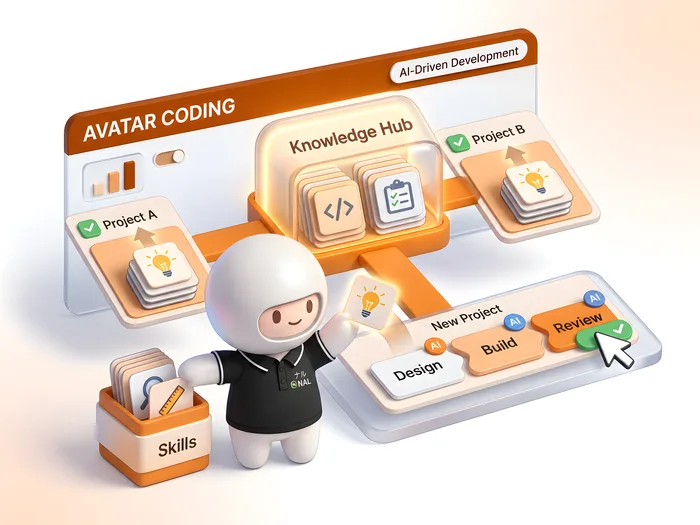
Illustration of AVATAR CODING. Knowledge from projects A and B gathers in Knowledge Hub, and Avatar, NAL's AI character, brings it to the design, coding, and review of a new project.

Sound familiar?

You've started using AI. But it hasn't become a strength of the organization.

People use AI coding tools on their own, and the tools are not an organization standard
Code from AI does not match your design principles or development rules
Knowledge stays inside each project and never reaches the next one
When a veteran leaves, their experience leaves too
As an organization, you cannot see how much AI is used or what it achieves
Sensitive information could leak out without anyone noticing

The AVATAR CODING approach

Not "Have we adopted AI?" but "How do we adopt it?"

AI-driven development, from individual practice to an organization-wide system

Using AI well should not be left to each person's own approach. We go one step further and share your organization's design principles and development rules with AI. The whole team then works from the same assumptions and develops software with AI.

How it works

Hand your organization's context to AI

AVATAR CODING gathers your organization's design principles and rules as shared Information AI reads as its starting point before it works. Here, it means your organization's design principles, development rules, technical know-how, and past implementations.. AI refers to it every day in design, coding, and review. What you learn along the way flows back to the organization.

Org context

  • Design principlesPolicy docs, Architecture Decision Record: a record of what was chosen in an important design decision, and why. People who join later can trace the reasons.
  • Development rulesCoding standards
  • Technical know-howInternal wiki, tech notes
  • Past work and lessonsPull request: a way to have other members check a code change before it is merged. The discussion stays on record and helps explain past decisions., incident logs

AVATAR CODING

One context platform for the organization

  • Skills
  • Agents
  • Commands
  • Hooks
  • Workflows
  • Knowledge Hub
  • Gatekeeper
  • Telemetry
  1. $ avatar init
  2. Loading the shared skill libraryOK
  3. Starting AI agentsOK
  4. Connecting to org knowledgeOK
  5. Turning on security gatesOK
  6. Starting usage trackingOK
  7. Everyone on the team is set up.

Supported LLMsClaudeOpenAIGeminiDeepSeekand more

Daily work

  1. DesignDesign that follows the policy
  2. CodingCode that meets the standards
  3. ReviewAutomatic checks at the gate
Lessons flow back

Team use

One entry point. Every member gets their own tasks.

Once AVATAR has your organization's context, it is not only for developers. Clients, product owners (POs), and the development team share one backlog, and AVATAR connects them.

Pick a sample request to see how it moves across the board.

One shared backlogEveryone works on the same board

Participants: client, proxy PO, AVATAR, development team

  1. Request1In

    Client

    #128

    I want to change my booking date and time later

    Client10:02

    Progress

  2. Spec1

    Proxy PO + AVATAR

    #128Drafted by AVATAR

    Booking change feature

    • Changes allowed until 18:00 the day before
    • Only open slots can be chosen
    • Send a confirmation email after a change

    Uses design principles

    Client confirmedProxy PO approved

  3. Tasks3

    AVATAR

    • #128-1

      API: change a booking

      M
    • #128-2

      Screen: pick a new time

      L
    • #128-3

      Email: send confirmation

      T

    Uses past work and lessons

  4. Acceptance criteria3

    AVATAR

    #128Written by AVATAR

    • No changes after 18:00 the day before
    • Full slots cannot be chosen
    • A confirmation email arrives after a change

    Uses dev rules

  5. To developersOut

    Dev team

    Sent to each owner

    • M#128-1Received
    • L#128-2Received
    • T#128-3Received
    • QACriteriaReceived

    Arrived with acceptance criteria. No copy and paste

The PO turns the client's request into a spec. AI breaks it into tasks and acceptance criteria and sends them straight to the developers. No copy and paste needed.

Illustrative screen, not the actual product UI. All requests are fictional examples.

Screens

See your organization's rules all in one place

Skills, agents, Knowledge Hub, and Gatekeeper. Manage your organization's rules for using AI on one screen.

Shared skills are the AI's work manual.A place to register your organization's rules and steps. Whoever asks, the AI works to the same standard.

Agents are AI team members, one for each step.AI agents with set roles split the design, coding, review, and testing between them.

Knowledge Hub is a shared archive for all projects.A place that keeps past implementations and solved problems. In later work, the AI refers to it again.

Gatekeeper is the AI's safety guard.Risky actions, such as direct changes to production data, are stopped before they run. Actions that need judgment wait for a person to approve them.

The Usage screen makes AI use visible.See in numbers how much AI each team uses each week.

The Models screen is the switch for which AI you use.Choose which AI (Claude, OpenAI, and others) handles which work. You can change the choice later to fit the use case or the cost.

Shared skills36By last update

SkillScopeStatusUpdated
All teamsSharedSep 30
BackendSharedSep 25
All teamsSharedSep 18
InfraDraftSep 11

32 more skills

Coding standardsShared

Scope: All teams

  1. Start function names with a verb
  2. Return errors in the shared format
  3. Set a retry limit for external API calls

Sato · updated Sep 30

Agents12Flow: standard

StepAgentTaskSkills used
DesignDesign agentDrafts a design from requirementsDesign policy
CodingCoding agentWrites code to the designCoding standardsNaming rules
ReviewReview agentChecks against review criteriaReview criteria
TestTest agentAdds and runs testsTest policy

8 more, such as security audits, documentation, and bug investigation

Knowledge HubAll projects

Frequent searches

  • Payment API: duplicate preventionpayment-api · 20258 uses
  • Error design for refundspayment-api · 20255 uses
  • Retries for external payment servicesbooking · 20243 uses

Showing the top 3

Gatekeeper16All active

RulesActionScope
Direct changes to the production DBBlockAll teams
API keys or vulnerabilities in codeBlockAll teams
Bulk file deletionAsk firstAll teams
Adding dependenciesAsk firstBackend

12 more rules

Waiting for approval: bulk file deletion (32 files)Coding agent · 10:31

Recent log

  • BlockedStopped a connection to the production database
  • ApprovedSuzuki approved adding a dependency

UsageSep 28 to Oct 2

AI use this week

1,248 uses

Last week: 1,106

Active members

36 people

of 42 registered

Top skill

Coding standards

This week: 412 uses

AI use by team (this week)Unit: uses

  • Backend486
  • Frontend392
  • Infra214
  • QA156

Models53 connected · 2 not set

ModelMain useStatus
ClaudeDesign, reviewConnected
OpenAICoding helpConnected
GeminiResearch, summariesNot set
DeepSeekCoding helpNot set
LLM gatewayOne connection for other modelsConnected

Illustrative screen, not the actual product UI. All names and numbers are fictional.

Features

Your development culture, in a form AI understands

01

Share your rules in a form AI can use

Define naming and structure conventions, design principles, and development rules as Your organization's rules, written in a form AI can read. Register coding standards, review criteria, and more, and AI refers to them every time it works., and the whole team shares the same standard. No more gaps in how each person uses AI.
02

AI agents with a role for each step

Design, coding, review, and other steps each get an AI AI that moves work forward by itself, following a set role and steps. You can give each step its own role, such as design, coding, or review.. These agents support your development. You can define the way your organization works directly as the AI's work steps.

03

Commands and hooks

Turn repeated work into commands, and use Something that runs by itself at a set moment. For example, it can check that code meets the standards every time before the code is saved. to build that work into your daily development process.

04

Knowledge Hub

Knowledge from each project is stored in a form the next project can reuse as is. No need to wait for someone to write documentation. You will not repeat the same mistake.

05

Gatekeeper and telemetry

Manage AI use as an organization. Control what AI may do, and see how it runs with Automatic records of who used AI, where, and how much, shown in numbers.. It catches API keys (which work like passwords) and security weaknesses in your code before it leaves your hands. Because AI use shows up in numbers, it also helps you make investment decisions.

Illustrative screen, not the actual product UI. All names and numbers are fictional.

Standard kit

Ready from day one

These are not plans for later. The moment you turn on AVATAR CODING, everyone on the team gets all of this.

  • SKILLS

    50+

    Expert skills ready to use

  • AGENTS

    20+

    AI agents by role

  • COMMANDS

    50+

    Automated commands

  • SECURITY

    24/365

    Security gates that never stop

Why AVATAR CODING

We don't hand you a tool and walk away

Beyond the features themselves, here is what pays off after rollout.

NAL engineers around a meeting room table, working on laptops
  1. We use it every day in our own development work

    We turned the system our engineers use in daily development into a product. Practices that did not last inside our company are not in it. We kept only what proved useful on real projects.

  2. Switch to another AI later if you need to

    It supports several models, so you can switch when you rethink use cases or costs. It works with major models such as Claude, OpenAI, Gemini, and DeepSeek, so you are not locked into one AI.

  3. Runs on top of your current setup

    It works with the editors and source control you already use. It also supports GitHub and GitLab, so you do not need to rebuild the way you develop.

  4. Designed by a development company

    NAL builds it, and we have done contract development for a long time. So it is designed around review, quality checks, and other steps that real projects cannot skip. After rollout, staff who know hands-on development can advise you on running it.

Results

Turn individual practices into an organization standard

Scroll sideways to see more

BEFORE AI use left to each person Use and results depend on the personOutput doesn't match company rulesKnowledge stays inside each projectNo one knows if AI is helpingNew members take months to get up to speed AFTERAI used organization-wide AI works from the same context and standards Output follows organization rules Knowledge carries over to the next project AI use shows up in numbers New members can get results from day one

A good fit for

  • Contract development and software companiesYou want delivery speed and quality to stay steady across projects.
  • Product and development teamsYou want to move from everyone using AI their own way to one shared pattern.
  • Growing organizationsYou want to keep quality and ways of working as the team grows.

Rollout

From a small team to the whole organization

STEP 01

Assess where you are

Map your current AI use and where your development rules and knowledge live.

STEP 02

Define the context

Turn design principles and standards into guides AI can read (skills) and step-by-step work processes (workflows).

STEP 03

Pilot

Run it with a target team, and tune the output quality and the operating rules.

STEP 04

Company-wide rollout

Widen the scope, build up knowledge, and make usage visible.

FAQ

Questions we often get before rollout

It supports multiple large language models (LLMs), so you may be able to keep the models you use now. Talk to us about your setup.

Yes. We recommend starting by listing the unwritten rules your teams already share. Then you refine the rules as you use them.

AI writes code after your organization's design principles and standards are shared with it. The review step is built into the process too. The platform also lets you control what AI may do.

Yes. The smaller the team, the more each person's way of working matters, and the more easily knowledge stays with individuals. You can start small and expand.

Tell us about your challenges and goals

Contact us