



Language: English
Contact us

Solutions / AVATAR SALES

Solutions / AVATAR series, NAL's AI platforms for business

Agentic CRM

AVATAR SALES

AI-native sales platform

AVATAR SALES is an AI-native sales platform that redesigns sales and marketing around AI. AI understands your company data and customer information, and helps at every step from finding prospects to outreach and follow-up. It goes beyond sales support tools: AI runs the sales work itself.

  1. Prospect
  2. Reach out
  3. Track
  4. Follow up

Illustrative AVATAR SALES screens. Scene 1, Prospect: AI scores saved companies you haven't contacted yet and ranks them, with Company B first. Scene 2, Reach out: AI writes an email for each company, and the rep checks it and sends it. Scene 3, Track: email opens and clicks are logged, and replies are detected and flagged. Scene 4, Follow up: AI reads and summarizes the reply, then drafts a response with date options for the rep to fill in.

Illustrative screen, not the actual product UI. All numbers and company names are fictional.

Models and integrations

Works with the AI models you already pay for.

AI models
  • Claude
  • OpenAI
  • Gemini
  • Other models too
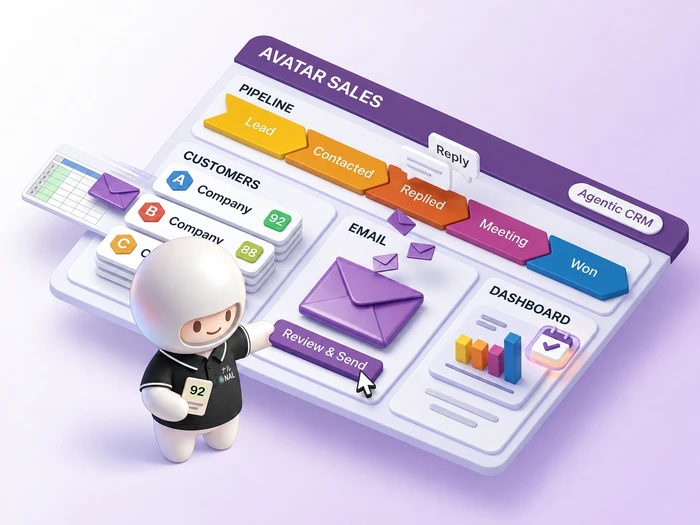
Illustration of AVATAR SALES. NAL's AI character, Avatar, points to the pipeline stages (Lead, Contacted, Replied, Meeting, Won), a company list with priority scores, an email the rep checks before sending, and a dashboard of results up to meetings.

Sound familiar?

Results vary widely from rep to rep.

  • Finding new customers depends on the skill of a few reps

  • Choosing prospects and writing emails leaves too little time for sales meetings

  • With tools scattered, customer conversations aren't managed in one place

  • You can't see how people respond to your emails, so next steps come down to gut feel

The AVATAR SALES approach

Rebuilding sales around AI

Which companies to contact, what to send, and what to do next. Reps used to work this out one deal at a time. In AVATAR SALES, the AI agent works these out ahead of time from customer and company data and suggests them. Reps check the suggestions and decide, then spend the time saved talking with customers.

  1. Traditional CRM Records

    People enter and manage customer details and the status of each deal.

  2. CRM with an AI assistant Answers

    Ask a question, and AI finds the information and answers it.

  3. Agentic CRM / AVATAR SALES Acts

    Without waiting to be told, AI picks who to contact, writes the emails, and shows how to handle replies.

How it works

From prospecting to follow-up, without a break

The AI agent supports prospecting, outreach, and follow-up. Reps run the meetings.
Companies that are won or lost leave the cycle, and no emails go to addresses that opted out or bounced. Sends, opens, clicks, replies, and other engagement are recorded on the platform.

Sales data

  • Customer and company data
  • Sent and received email history
  • Website activity data

Sales cycle

AVATAR SALESAI agent

  • Done by the AI agent
  • The rep decides and acts
  1. Prospect

    Done by: AI agent

    AI suggests which companies to prioritize

  2. Reach out

    Done by: AI agent and rep

    AI writes the email for the rep to check and send

  3. Meet

    Done by: rep

    The rep runs the meeting

  4. Follow up

    Done by: AI agent and rep

    AI reads replies and suggests next steps for the rep to decide

After follow-up, the cycle returns to prospecting and repeats the 4 steps. The cycle has 2 exits. Companies won or lost at the meeting stage leave the cycle. Companies moved to nurturing after follow-up are contacted again later.

Screens

See AI suggestions and deal status at a glance

Pipeline lays out your deals on a digital whiteboard. Companies are grouped by stage, and AI lists them by priority. Press “AI suggestions” to see which deals to act on next.

The AI agent is your sales advisor. It suggests which companies to prioritize and what to write, based on company data and email engagement. Send a request from the box below, and AI does the work and reports back.

This is the review screen for drafts the AI wrote. Pick a draft for each recipient to see its text. The rep reviews the text and decides whether to send it.

Bulk email is where you send one message to many at once. Pick a recipient to see the merge fields turn into the actual text.

Workflow is an automatic playbook for what happens after you send. Press “Replied” or “No reply” to see what happens next in each case.

Dashboard gives you a view of all your sales in one place. See the path from sending to meetings, and the replies that need action, all in one place. Press a period button to switch the numbers.

Pipeline

New business pipeline3,993

  1. 2,640Lead
  2. 980Contacted
  3. 164Replied
  4. 52Meeting
  5. 19Negotiating
  6. 12Won
  7. 126Nurturing
Companies sorted by AI score, highest first
CompanyContactLast contactAI scoreNext action (AI)
Company AHead buyer2026-09-2992Resend the quote
Company BPlanning manager2026-09-3088
Company CIT staff2026-09-0474
Company DSales promotion manager2026-08-2861Reach out again
Company EAdmin2026-08-2138Move to nurturing

The pipeline stages shown are only an example.

AI agent

AI agent

Works from your stored company data and email engagement

  1. AI agent

    Hi Sato, how can I help? I can suggest prospects, rank priorities, draft emails, and read replies for you.

  2. Sato (Sales)

    Which companies should I follow up with this week? List them by priority, and draft any emails I need.

  3. All 4 tasks done

    1. Checked email engagementOpens, clicks, replies
    2. Read the replies2 replies from Companies A and B
    3. Ranked prioritiesScored stored companies
    4. Drafted emails2 drafts for Companies B and C
  4. Here are the 3 top-priority companies. I left out Company A because its rep is already resending the quote. A rep reviews each draft before it's sent.

    • Company BRepliedAI score88

      They replied asking for possible dates for a meeting next week. I've drafted a reply with date options. The rep fills in the dates and times.

    • Company F (manufacturing)Not contactedAI score81

      This is a high-priority company in your data that you haven't contacted yet. Add it to your prospects?

    • Company C (staffing)ContactedAI score74

      They keep opening your emails and clicking the links. I've drafted a follow-up that includes a case study.

Ask the AI agent

Compose

Drafts2

From: sato@example.co.jp

Written by AIDraft

To
Planning manager, Company B
Subj.
Possible meeting dates

Dear Planning team at Company B,

I hope you're doing well.
Thank you for getting back to me.

Here are some possible dates for our meeting:
Option 1: Enter date
Option 2: Enter date

We can meet online or visit your office, whichever you prefer.
Please let me know which option works best for you.
Best regards,

The rep fills in dates, checks, and sends

Bulk email

Our new fall serviceBulk email

From: suzuki@example.co.jp

To350 companies

Companies picked from the New business pipeline (1 contact each)

345 more

Template (written by the rep)

To
CompanyCompany C, NameKobayashi
Subj.
NameKobayashi, introducing our new fall service

CompanyCompany C, DepartmentIT Department
Dear NameKobayashi,

I hope you're doing well. This is Suzuki from sales.

Following up on my last email, I'd like to introduce a new service we launched this fall. IndustryStaffing companies are using it too.

For details, please see the materials below.
(Materials page URL)
Best regards,

If you'd rather not get these emails, you can unsubscribe here.

Not sent0 / 350 emails

Sends to the 350 selected companies in turn. You can pause at any time.

Workflow

Follow up new leadsActive

  1. Send1st email
  2. WaitFor 3 business days
  3. BranchDid they reply?
    • Replied
      StopSend no more emails in this flowAI reads the reply and suggests the next step
    • No reply
      SendSend 2nd email

Dashboard

HomeResults from sending to meetings

From email to meetingBulk email and workflows

Emails to companies

2,660

Last month: 2,410

Reply rate3.7%

Companies that replied

98

Last month: 84

Of replies20%

Moved to a meeting

20

Moved by a rep to “Meeting” or later

Replies to handleAI has read them and suggests next steps

51+ business days: 2

  • Company A92Yesterday1+ business days

    “We'd like to go over the quote terms again.”

    AI suggestionResend the quote

  • Company B882 hours ago

    “Could you share possible dates for next week?”

    AI suggestionSet a meeting date (reply drafted)

These are current counts, whatever the period. Reps do the sending.

Sending healthTargets that protect your sender reputation

Good (1 warning)

Bounce rate
1.2%Target: under 2%
Opt-out rate
0.4%Target: under 1%
Excluded
12Addresses that bounce as unknown are skipped from the next send

Sending domain verified

Results by bulk email and workflowMost meetings first

Results by bulk email and workflow, most meetings first
CampaignSentOpens (approx.)ClicksRepliesMeetingsBouncesOpt-outs
WorkflowActive840to 42047%12%8.1%34 firms90.6%Good0.7%Good
Follow up info requestsWorkflowActive360to 15058%19%11.3%17 firms50.3%Good0.0%Good
Trade show thank youBulk emailDone1,210to 1,21044%9%2.4%29 firms42.6%Warning0.5%Good
Customer case studyBulk emailDone880to 88039%7%2.0%18 firms20.5%Good0.2%Good
Bulk emailNot sent—(not sent yet)to 350Not sent yetNot sent yetNot sent yetNot sent yetNot sent yetNot sent yet

Opens, clicks, replies, and opt-outs are shares of recipient companies; bounces are a share of emails sent. Opens run high because images load automatically, so treat them as a rough guide. Each bar compares campaigns, with the top campaign in each column as the full bar. A campaign is Good when its bounce rate is under 2% and its opt-out rate is under 1%. Meetings counts the companies a rep moved to “Meeting” or later.

Illustrative screen, not the actual product UI. All numbers and company names are fictional.

Features

AI takes on the day-to-day sales work

01Prospect suggestions and email drafts

AI picks who to contact and drafts the email

Based on the customer and company data you've built up, AI uses Giving each company a score, then ranking them by who to contact first. to suggest which companies to contact first. AI also writes emails tailored to each company, so you spend less time writing them.

02Reading replies

Reads replies and suggests the next move

AI reads each reply and suggests what to do next, such as setting a meeting date, sending materials, or reaching out again later. Replies are detected automatically and kept apart from autoreplies, so none slip through.

03Workflow

Follow-ups that move with each response

Wait a few days after sending. Branch on whether the contact opened, clicked, or replied. Send the next email. You can set up steps like these as a workflow, and stop follow-up emails to anyone who replies.

04Email delivery

Email delivery built to reach the inbox

Send from your own company address, whatever email service you use. Bulk email works too, with each recipient's name and company filled in one by one. A daily sending limit per sender, one-click unsubscribe, and automatic removal of bounced addresses protect your sender reputation. Anything over the limit goes out automatically from the next business day.

05Engagement tracking and reports

Tracking engagement on email and the web

Along with email opens and clicks, you can track visits to your website once you add a A tiny marker embedded in a website. It records who visited and when. to it. Reports then show engagement by contact, company, and pipeline.

Illustrative screen, not the actual product UI. All numbers and company names are fictional.

Why AVATAR SALES

Getting started should take as little effort as possible

We've removed the usual sticking points of adoption in advance.

In the office, 2 NAL team members talk as they look at a laptop screen together
  1. 01 Start with your current customer list

    Upload the customer list you already have as a CSV file. You can also import emails you've sent before, so you start with your past conversations in place.

  2. 02 When reps change, the history stays

    Email threads and engagement records stay on the same platform. When someone moves or leaves, the next rep can check the history and pick up where they left off.

  3. 03 Run AI on the models your company already pays for

    You can run AI on the The AI brain that reads and writes text (a large language model). Many providers offer different kinds. you already pay for, with your own A kind of password that lets software talk securely; like a login password, keep it secret.. You can set access rights by organization or member. Passwords for sending accounts and API keys are stored encrypted.

  4. 04 Start small, then expand

    Try it first with one team or one pipeline, and expand once you see it working. You don't have to roll it out company-wide at once, so you can judge whether it fits your sales team before you decide.

Illustrative screen, not the actual product UI. All numbers and company names are fictional.

Results

From gut feel and experience to data and a system

BEFORE Sales that depends on individuals

  • Each rep works and keeps records differently
  • Tools are scattered, so conversations are hard to follow
  • Customer relationships break off when people leave or move

AFTER Sales as a system

  • AI shows priorities and the next move
  • Conversations and engagement stay on one platform
  • Relationships carry over when reps change

Track record

This platform already powers a sales SaaS product

Our group company Terran Labs offers Sald, a sales SaaS product built on AVATAR SALES and combined with its own company database. It shows the same platform running every day as a service for outside customers.

Visit the Sald site (Terran Labs) (opens in a new tab)

This link goes to an external site. Sald is a service provided by Terran Labs.

Sald (Terran Labs)

What Sald added

  • Database of companies in Japan
  • Pricing plans and service brand

AVATAR SALES

What AVATAR SALES (the platform) handles

  • Managing contacts, companies, and pipelines
  • AI integration (choose which LLM to use)
  • Email delivery and engagement tracking
  • Automated follow-ups with workflows

Rollout

Build on how you sell today, one step at a time

  1. STEP 01

    Review where you are

    Map out your current sales process and the tools and data you use.

  2. STEP 02

    Prepare data and email setup

    Import your customer list and set up the email account you'll send from.

  3. STEP 03

    Pilot

    A pilot team runs the AI suggestions and follow-up flow for real, and you settle the working rules.

  4. STEP 04

    Company-wide rollout

    Widen the scope and add more pipelines and workflows.

FAQ

Questions we often get before rollout

Yes. Whatever email service you use, you can send from your own company address. You can also import emails you've sent before. We help with the sending setup when you get started.

You can import customer data as CSV, so you can start with the lists you already have. To run both side by side or move over, talk to us about what fits how you work.

Your sales reps can review and edit any email AI writes before it is sent.

We set up and build the AI agent features around your sales process and data, and roll them out in stages. A demo shows what you can use at launch.

Yes. The smaller the team, the less time there is to choose prospects and write emails. AI takes on that work, so even a small team can keep finding new customers.

Tell us about your challenges and goals

Contact us