

Language: English
Contact us

Solutions / AVATAR DATA HUB

Solutions / AVATAR series, NAL's AI platforms for business

AVATAR DATA HUB

AI-driven data platform

AVATAR DATA HUB is an AI-driven data platform that connects data scattered across your company. You can ask AI for the information you need in natural language, without building a data warehouse (DWH). It makes visualizing and analyzing data more efficient, which helps you make decisions and improve your work.

  1. Sales
  2. Orders
  3. Stock
  4. Expenses
  5. Share

Illustrative AVATAR DATA HUB screens. Staff in each department ask what they want to know in plain language, and AI checks the company’s data sources and answers with charts. Scene 1, Sales: the Planning team asks “This year’s sales vs last year?”, and AI shows sales, gross margin, and a chart against last year. Scene 2, Orders: the Sales team asks about orders by region, and AI shows the count and growth for each region in a bar chart. Scene 3, Stock: the Logistics team asks which items may run out, and AI lists the days of stock left. Scene 4, Expenses: the Accounting team asks about expenses by department, and AI shows the breakdown in a pie chart. Scene 5, Share: AI combines the 4 charts into one dashboard and creates a view-only share link.

Illustrative screen, not the actual product UI. All names and numbers are fictional.

Supported data sources and integrations

Connect the data sources across your company, as they are

Databases
  • PostgreSQL
  • MySQL
  • SQL Server
  • SQLite
  • Access
Sheets and files
  • Excel
  • CSV
  • Google Sheets
Cloud storage
  • Google Drive
Other
  • Ask us about other data sources
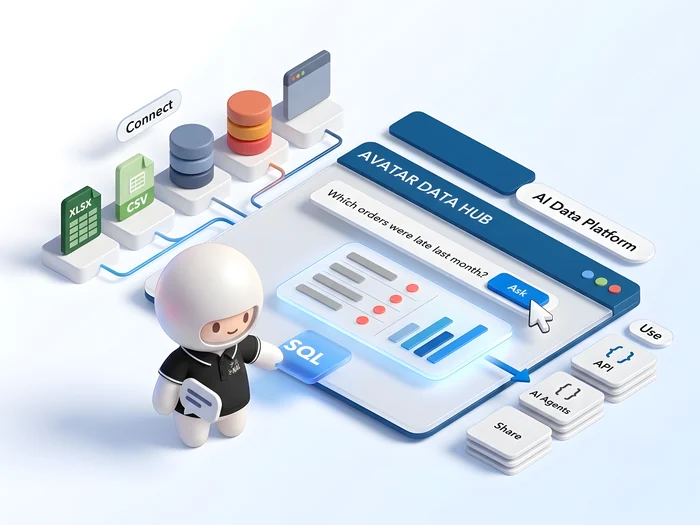
Illustration of AVATAR DATA HUB. Avatar, NAL’s AI character, walks you through the flow. You connect Excel, CSV, and databases and ask a question. AI writes the SQL and answers. You then use the results via API, AI agents, or share links.

Sound familiar?

You have the data, but can’t put it to use

  • Data is split by department, not in a form the whole company can use

  • You have been told that using data requires building a large DWH, so you haven’t started

  • Every time you check or total up data, you have to ask the person in charge

  • You want to use generative AI and AI agents, but there is no company data platform for them to draw on

The AVATAR DATA HUB approach

In the AI era, using data should be simpler

You can roll it out quickly and at low cost, without changing your current systems or the way you work each day. You don’t have to wait for a large data platform to be built. You can put the data you already have, as it is, to work in your business.

The old way (DWH + BI) Collect, then view

Setup
First, build a dedicated platform (DWH) to store data
Data
Move it to one place and clean it up before use
When you need answers
Wait for someone to build any report from a new angle

AVATAR DATA HUB Connect, then ask

Setup
Connect to your current databases and files as they are
Data
Use it where it is, in the original systems
When you need answers
Ask in plain language, and AI answers on the spot with charts and tables

How it works

Connect and use data without moving it

The glowing lines show which way query results flow. Data stays in the original systems, and each query reads only the part it needs.

Data sources (examples)UsersOutputs to other systems PostgreSQLRelational DB MySQLRelational DB SQLiteEmbedded DB SQL ServerRelational DB Excel, CSVFiles Google SheetsCloud spreadsheet AVATAR DATA HUB Data access layer Federated queriesJOIN DBs and files in place AI SQL and reviewQuestions to SQL, 5 auto checks Access rights and audit logsLimit visibility, log actions API and sharingPublish results as they are Keeps no copy of source data Business teamsAsk → charts and reports DevelopersCheck SQL, build in via API AdminsSet access, check audit logs AI agentsFrom Claude, Cursor, and more REST APICalled by your systems and apps MCP serverAI agents query within their access Share linkShare by URL (view only) Data sources (examples)UsersOutputs to other systems PostgreSQL MySQL SQLite SQL Server Excel, CSV Google Sheets AVATAR DATA HUB Data access layer Federated queriesJOIN DBs and files in place AI SQL and reviewQuestions to SQL, 5 auto checks Access rights and audit logsLimit visibility, log actions API and sharingPublish results as they are Keeps no copy of source data Business teamsAsk → charts and reports DevelopersCheck SQL, build in via API AdminsSet access, check audit logs AI agentsFrom Claude, Cursor, and more REST APICalled by your systems and apps MCP serverAI agents query within their access Share linkShare by URL (view only)

Screens

Answers turn straight into working tools

Marks the parts you can try.

AI is the interpreter between plain language and your database. Ask what you want to know, and AI writes and runs the SQL, then answers with a chart.

SQL is the instruction sheet for your database. Before AI-written SQL runs, AI SQL Reviewer checks it in 5 areas, including security and performance. It blocks risky operations and queries that would strain the server before they run.

API is the service window that passes data to other systems and apps. You can publish a saved query as it is, and set its A dedicated key for calling the API. Only apps that hold the key can use it., The maximum number of calls allowed in a set time. In this example, up to 60 calls per minute. It prevents overload from heavy use., When the same query repeats, the previous result is returned right away for a set time. In this example, 5 minutes. It reduces the load on the original systems., and expiry date.

Access rights work like a building pass issued to each viewer. In the same table, each viewer sees different rows and columns. The same rules decide what AI agents receive.

AVATAR DATA HUBWorkspace / Sales data

Pick a question to change the answer and chart.

The top seller is the 14-inch laptop. The top 5 products make up 46% of sales.

Sales by product (October, JPY million)

  1. 8.2Laptop
  2. 6.1Monitor
  3. 4.2Dock
  4. 2.6Keyboard
  5. 1.9Camera

sales_top5.sqlAI-written

SELECT item, SUM(amount) AS sales
  FROM sales_db.order_lines
 WHERE order_date >= '2026-10-01'
 GROUP BY item
 ORDER BY sales DESC
 LIMIT 5;

Read-only5 rows · 0.42s

AI SQL Reviewer

Press “Review” to see the AI check results.

Publishing settings (example) Live

Flip a switch to see the request change.

  • API key authenticationIssues a dedicated keyRequired
  • Rate limit60 / min
  • Cache5 minutes
  • Expiry dateUntil December 31, 2026
GET /api/v1/q/sales-top5X-API-Key: dh_live_••••3f9aX-RateLimit-Limit: 60/minExpires: 2026-12-31

Audit log

  1. 10:42Sales systemsales-top538ms
  2. 10:41AI agent (MCP)sales-top541ms
  3. 10:39Exec dashboardsales-top536ms

Viewer

Sees all rows and columns.

Sales by client in JPY (the rows and columns shown change with the viewer)
FirmRegionRepSalesMarginPhone
Co. AEastTanakaHidden12.4M32%Hidden03-0000-0001Hidden
Co. BWestYamaguchiHidden9.8M28%Hidden06-0000-0002Hidden
Co. CEastSasakiHidden7.6M35%Hidden045-000-0003Hidden
Co. DSouthNakamuraHidden5.4M22%Hidden092-000-0004Hidden
Co. EEastTanakaHidden4.1M30%Hidden03-0000-0005Hidden

Illustrative screen, not the actual product UI. All company names, personal names, and numbers are fictional.

Features

Connect, ask, and use, all on one platform

01

Connect data without building a DWH

A federated query engine reads data sources scattered across your company, such as ERP, CRM, Excel, and Google Sheets, all in place. There is no need to move or copy data, so you can start without waiting for a large data warehouse to be built.

02

Ask what you want to know, in your own words

An AI agent turns natural-language questions into SQL. Staff without SQL skills can reach the data they need, so you cut the requests and waiting that came with every check or tally.

03

SQL editor and instant REST API

You can publish any query you write directly as a REST API. Your existing systems and in-house apps can use it right away.

04

MCP support

AVATAR DATA HUB supports Model Context Protocol (A common set of connection rules (an open standard) for linking AI agents to company data and tools. AVATAR DATA HUB runs as an MCP server, so AI agents can read data directly within their access rights.). This lets AI agents draw on your company data as they work.

05

Fine-grained access control

Role-based access control (RBAC) lets you manage which data each department or person can see.

Illustrative screen, not the actual product UI. All names and numbers are fictional.

Why AVATAR DATA HUB

Start without pausing your current work

We have already removed the snags that often stall the first steps of using data.

NAL members around a meeting room table, with one member standing and holding documents.
  1. 01 No change to how you work

    Keep using your existing systems as they are. You can start without changing where data lives or how it is entered each day. Your teams get no new data entry work either.

  2. 02 No data warehouse to build

    You don’t need a large data warehouse or a system to collect data. Connect databases such as PostgreSQL, MySQL, and SQL Server, plus CSV, Excel, and Google Sheets.

  3. 03 Start fast at low cost

    You can try it right away in a cloud environment we provide. You can start with one team, then expand to the whole company. We can also set it up in your environment and build integrations with your existing systems.

  4. 04 Talk to us in Japanese

    From planning the rollout to after go-live, our Japan team is your point of contact and stays with you. You can discuss requirements and everyday questions in Japanese.

Illustrative screen, not the actual product UI.

Results

Turn time spent finding data into time to think

BEFORE Data in silos

  • Scattered across separate files and systems in each department
  • Every tally or check means asking someone
  • Not in a form AI can draw on

AFTER Everything reachable from one platform

  • Check the data you need across sources, on the spot
  • Ask in natural language, without waiting for anyone
  • Use it directly from APIs and AI agents too

Rollout

Start small, grow as you go

You don’t need to roll out company-wide from day one. Our team works with you from the first review of challenges and data, and widens the scope as you confirm results.

A NAL member pointing at a chart on a screen while explaining.
  1. STEP 01

    Review challenges and data

    We map the business problems you want to solve, and what data sits where in your company.

  2. STEP 02

    Connect data sources

    We connect the target data sources to the platform and leave your existing systems as they are.

  3. STEP 03

    Pilot and access design

    While you use it in real work, we design each department’s access scope.

  4. STEP 04

    Company-wide rollout and API integration

    We widen the scope and open it up for use from APIs and AI agents.

FAQ

Questions we often get before rollout

No. It reads your existing systems and data sources as they are, without moving or copying data. You can adopt it without changing how you work each day.

Yes. It is designed to work without a DWH. It reads across scattered data sources, so you can start without waiting for a data platform to be finished.

It supports business systems such as ERP and CRM, Excel, Google Sheets, and various databases. Please contact us to discuss your specific systems.

Yes. With role-based access control (RBAC), you can set which data each department or person can see.

Tell us about your challenges and goals

Contact us